Materials
A material is what an element is made of: concrete, brick, timber, glass. It has a colour, a cut hatch (the pattern drawn where a section cuts through it) and a surface (how rough, metallic or see-through it looks in 3D). Materials are exported to IFC with the elements.
The material library
CreaBIM comes with 52 common building materials in 17 categories. Materials › Add from the library adds one, or a whole category with Add them all. The material browser's Library tab shows them with descriptions.
The material browser
Materials › Material browser… lists the project's materials by category, with how many elements use each.
- Add, duplicate, rename and edit materials, with a live preview ball.
- Select them selects the elements that use a material; Assign to the selection gives it to the selection.
- Delete asks what the elements still using it should be made of instead.
- Rate gives it a price per m², m³, m or piece for the take-off.
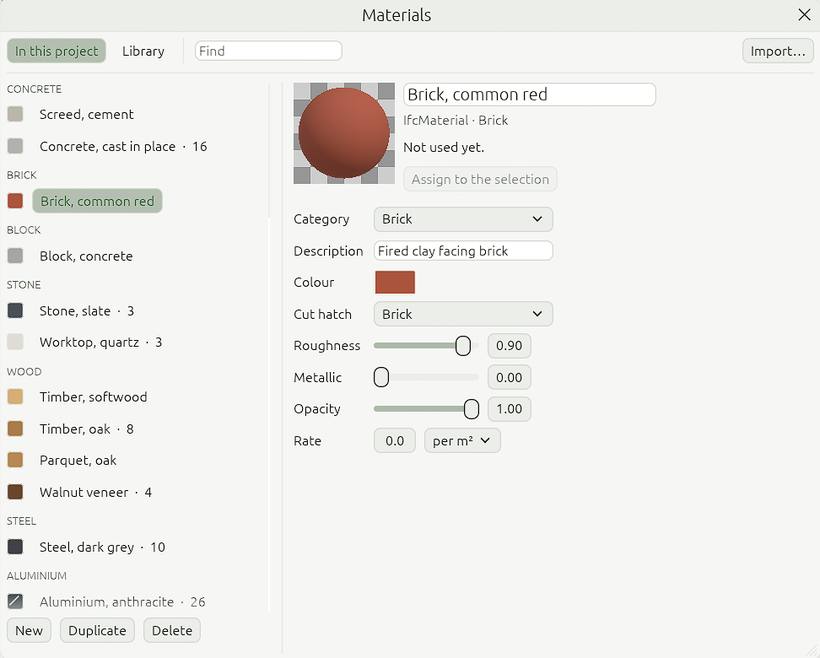
Selecting a material in the project browser shows the same editor in Properties.
Giving an element a material
Select it, then pick the material in Properties, or use Materials › Assign material. This works for walls, slabs, roofs, masses, doors, windows, columns, beams, stairs and railings. Layered walls, floors and roofs get their materials from their assembly.
Importing materials
Materials › Import materials… reads materials from IFC files, FreeCAD material cards (.FCMat), glTF files (.gltf, .glb) and Blender files (.blend). A material whose name the project already has is updated, so its elements follow.