Divide
On this page
Divide splits an element into parts: a wall into panels or courses, a beam into bays, a shelf unit into shelves. It can cut the element, put guides at the divisions, or place a copy of something in each part.
Opening Divide
- Select a wall, a beam, a guide, or a part drawn from a plan outline.
- Right-click it and pick Divide…, use Edit › Divide…, or click Into even parts… in the Make from it section of Properties.
A slim Divide bar opens at the top of the views, and every view shows where the divisions fall while it is open: ticks in plans, lines in sections and 3D, and each part's size on a chip. Drag the bar by its grip to move it; a double-click puts it back.
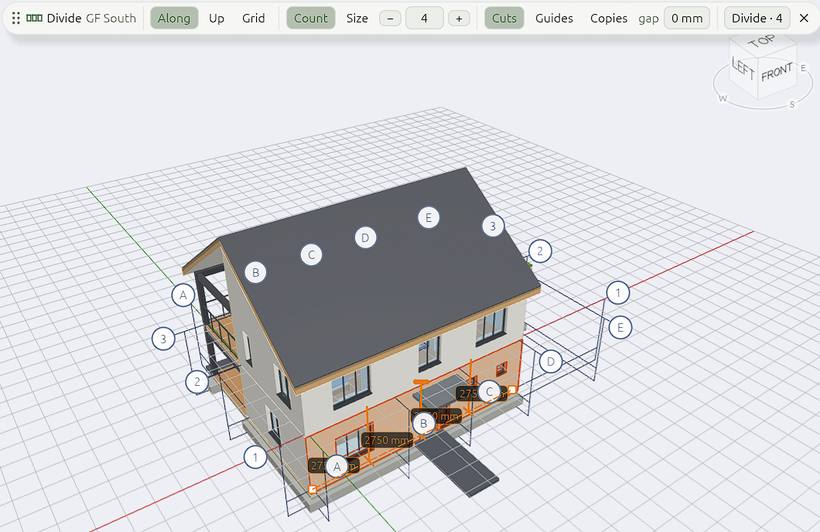
The Divide bar
| Setting | What it does |
|---|---|
| Along, Up, Grid | Along its length, up its height (courses, bands, shelves), or both ways at once: panels |
| Count or Size | So many parts, or parts of a size. Change the number with − and +, the mouse wheel, by dragging it or by typing |
| Rest (with Size) | Where what is left over goes: Rest at both ends (full parts centred, a short one at each end), at the start, at the end, or Spread evenly (as many equal parts as are nearest the size) |
| Cuts, Guides, Copies | What it makes at the divisions (below) |
| Gap (with Cuts) | Left between the parts: a joint |
Press Enter, or click Divide · n, to divide: the whole division is one undo step. Esc leaves the bar without changing anything.
Divided parts remember how they were divided for the rest of the session, so Divide on one of them opens as it was left.
What it makes
| Make | Gives |
|---|---|
| Cuts | The element cut into parts: a wall into walls side by side or stacked (a base course, bands), a part into bays or shelves. With Grid, panels both ways |
| Guides | A guide across it at each division, to snap to, shown dashed while you set it up. With Grid, guides both ways |
| Copies | What you Shift+click, one in each part |
For Copies, open Divide on the element first, then Shift+click what goes in each part. A sketch has to be extruded first, or draw a guide along it.
Tip: Divisions in the snaps list snaps to the even parts of any edge (its thirds, quarters, fifths…) without changing anything.
To cut an element along a line of your own instead, use Split.